PROOF OF WORK
BUILT. TESTED. PROVEN.
Documented examples of systems we’ve built, configured, troubleshot and verified — from Windows device QA to Active Directory and Microsoft Intune.
Clear evidence. Documented testing. Verified results.
ABOUT THESE PROJECTS
PROJECT OVERVIEW
SAMPLE / DEMONSTRATION — NOT A CUSTOMER JOB
DEMO-001 — Windows 11 VM Rebuild & QA Demonstration
SEE THE EVIDENCE
A sample of the checks recorded during the DEMO-001 Windows 11 rebuild and QA demonstration.

VERIFIED
01 — OPERATING SYSTEM VERIFIED
Windows 11 Pro 25H2 installation verified through Windows System information.
CHECKED
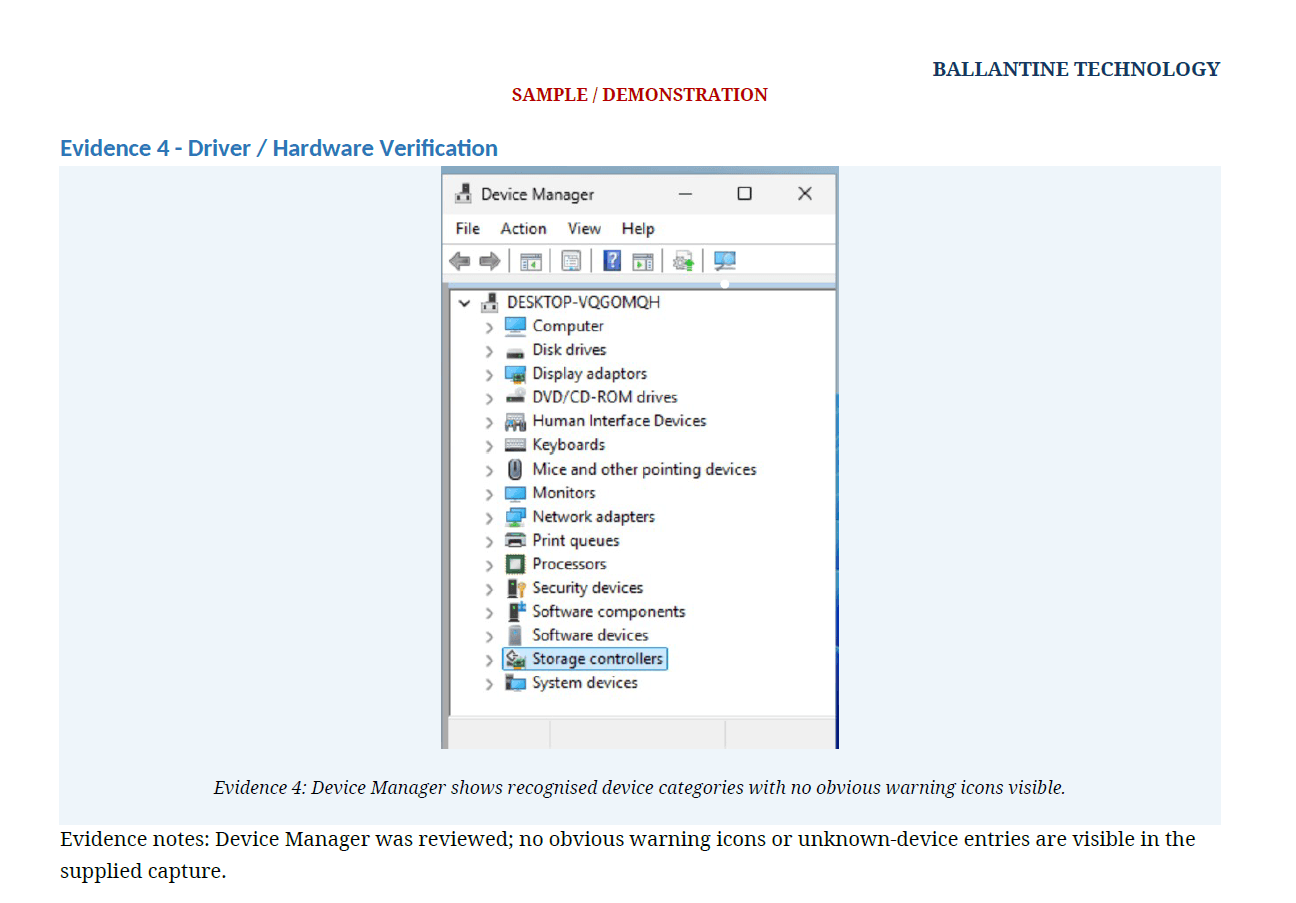
02 — DEVICE CHECK
Device Manager reviewed for recognised hardware and obvious warning or unknown-device entries.

VERIFIED
03 — WINDOWS UPDATE
Windows Update checked and reporting the system as up to date.
DEMO-001 RESULT
PASS WITH NOTES
DEMO-001 is a virtual-machine demonstration created to show Ballantine Technology’s QA and documentation process. It is not a customer job. Secure data sanitisation was not performed or claimed as part of this demonstration.
View Sample QA Report
View the full DEMO-001 sample QA & Proof-of-Work report (PDF).
View the complete DEMO-001 report for the full evidence set, QA checks and completion documentation.
Need Microsoft IT Support?
Explore our Microsoft 365, Azure, Intune, SCCM and infrastructure support services.
CONFIGURED → TESTED → VERIFIED → DOCUMENTED
BUILT. TESTED. PROVEN.
DEMO-002 / WINDOWS INFRASTRUCTURE
Windows Server 2022 Active Directory & Group Policy
A complete Windows infrastructure demonstration covering Active Directory Domain Services, DNS, Windows 11 domain integration, PowerShell automation, Group Policy, backup and verification.
DEPLOY SERVER → AD DS + DNS → DOMAIN JOIN → AUTOMATE → GROUP POLICY → VERIFY → BACKUP

ACTIVE DIRECTORY
Active Directory domain services configured and operational.

POWERSHELL AUTOMATION
Active Directory user provisioning automated and validated using PowerShell.

GROUP POLICY ENFORCEMENT
Central Group Policy successfully enforced on the Windows 11 endpoint.

BACKUP VERIFICATION
System State recovery set verified and recoverable items inspected using Windows Server Backup.
✓ VERIFIED
The environment was configured, tested and documented as a technical demonstration of Windows Server administration, Active Directory, DNS, PowerShell automation, Group Policy and backup verification.
DEMO-003 / CLOUD DEVICE MANAGEMENT
Microsoft Intune & Windows Autopilot
A complete cloud-managed Windows deployment demonstrating Microsoft Entra ID, Intune enrolment, Windows Autopilot, device compliance, security configuration and deployment troubleshooting.
AUTOPILOT → ENTRA ID → INTUNE → COMPLIANCE → SECURITY → VERIFIED

WINDOWS AUTOPILOT
Windows Autopilot device preparation and setup successfully completed.
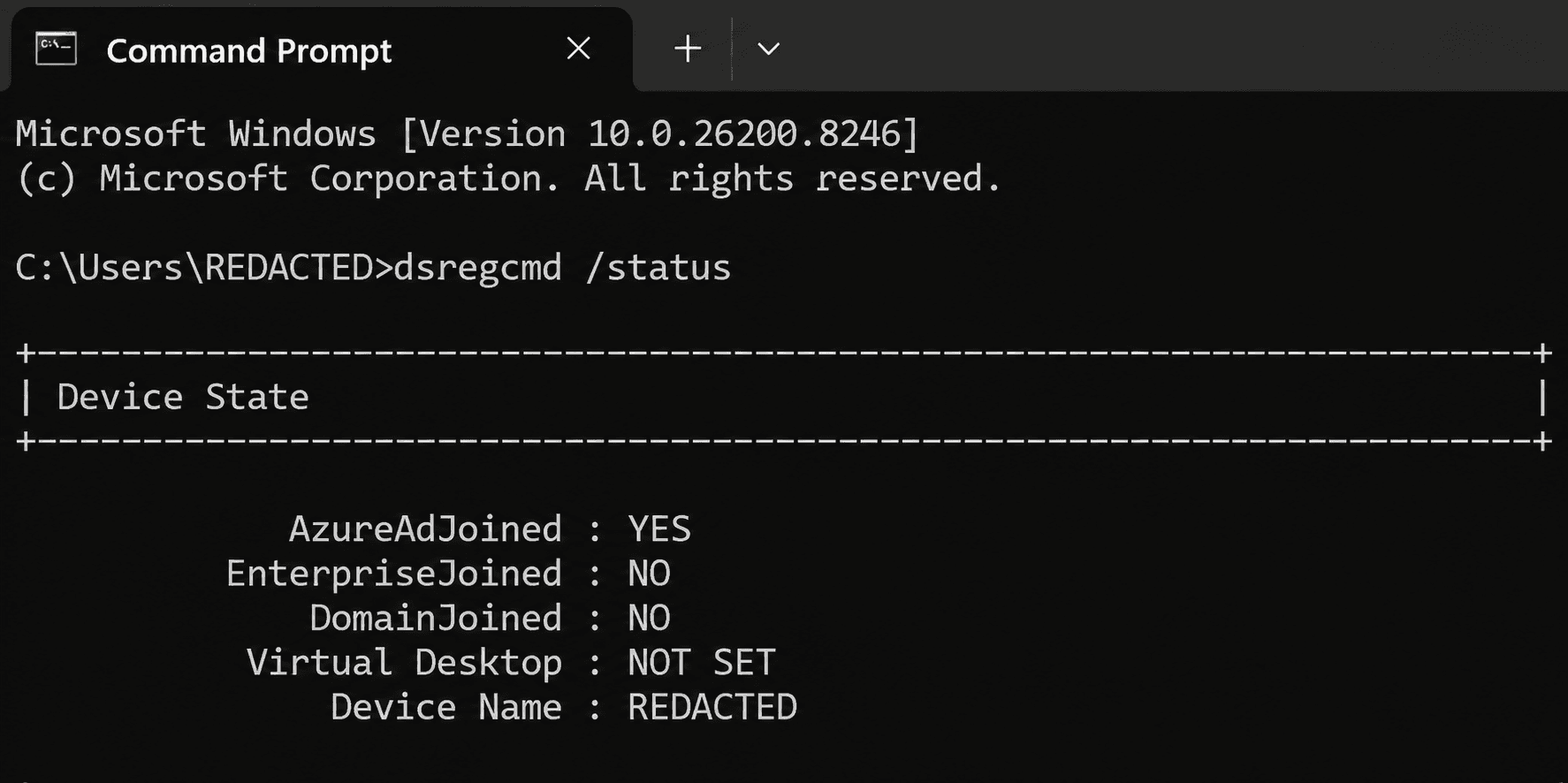
MICROSOFT ENTRA ID
Windows endpoint successfully joined to Microsoft Entra ID and validated from the device.

DEVICE COMPLIANCE
Security and compliance requirements successfully applied and verified through Microsoft Intune.

DEVICE SECURITY
BitLocker encryption deployed with recovery-key escrow demonstrated.
✓ VERIFIED
Windows provisioning and cloud device management were configured, troubleshot, tested and documented through the complete deployment lifecycle.
DEMO-004 / MICROSOFT 365 EMAIL SECURITY
A structured Microsoft 365 email security assessment covering DNS and mail routing, SPF, DKIM, DMARC, inbound and outbound authentication, deliverability and sender configuration.
DISCOVER → DNS & ROUTING → AUTHENTICATION → DELIVERABILITY → VERIFY → DOCUMENT

DNS & MX ROUTING
Microsoft 365 mail routing and DNS resolution successfully verified.

DKIM CONFIGURATION
Microsoft 365 DKIM selector records published and successfully resolving.

INBOUND AUTHENTICATION
Controlled inbound email successfully passed SPF, DKIM, DMARC and Microsoft composite authentication.

OUTBOUND AUTHENTICATION
Controlled outbound Microsoft 365 delivery successfully passed SPF, DKIM and DMARC authentication.
✓ VERIFIED
OPERATIONAL — SECURITY HARDENING RECOMMENDED
Microsoft 365 email routing and authentication were successfully verified through controlled testing. Additional recommendations were documented to strengthen the environment further.
Whether it’s a problem PC, Microsoft 365, Windows devices, Active Directory or IT infrastructure, Ballantine Technology takes a straightforward approach:
FIND THE PROBLEM. FIX THE PROBLEM. TEST IT. PROVE IT.